Within the many iOS updates that are pushed to iPhones and iPads, Apple offers hidden gems that go unnoticed. Here, we’ll highlight five of these features that can simplify workflow on your iPhone, and even speed up your device when it’s sluggish. All of the tips in this article work with the latest versions of iOS 9, so continue reading to learn more.
1. Free up RAM
 After using a bunch of apps, or perhaps leaving a lot of background downloads on, your device gets sluggish. While restarting the device will often fix this, there’s another option to consider that won’t interrupt what you’re doing. Free up memory by performing these easy steps:
- Navigate to the device Home Screen.
- Press and hold the Sleep/Wake button on the device.
- When the Power Off screen appears, release the Sleep/Wake button and press and hold the Home button (Figure A).
- After a few seconds, the device will show the Home Screen again.
By taking these steps, you can remove all the caches from memory and free up resources, ultimately often speeding up a sluggish device.
2. Remove downloaded software updates
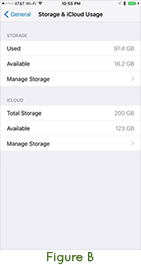 When a new version of iOS is available, Apple automatically downloads it to your device in order to make the update faster from the point you click the Install button. If you don’t want to install the update immediately, you can remove the update file from your device and free up space. To remove the update, follow these steps:
- Open Settings -> General -> Storage & iCloud Usage.
- Manage Storage under the “Storage” heading (Figure B).
- When an update has been stored on the device, an item will appear called “iOS [Version Number].”Tap it.
- In the view that appears, tap the “Delete Update” button, and then confirm by tapping “Delete Update” in the prompt again.
This will remove the update from your device, clearing the space that was taken up by the related files.
3. Reset the store apps
Sometimes the App Store, iTunes Music Store or iBook Store can “hang,” either displaying incorrect images or just not operating well. In these cases, you can easily reset the App Store cache and reload the store pages.
To do this, open the store, tap once and continue to tap on the first “Featured” tab in the tab bar of the store. You will notice the screen flash white after about 10 consecutive taps, and the store page will reload. When this flash occurs, the store has been reset and the cache emptied, possibly fixing any issues you were previously experiencing.
4. Enable text-based emoji keyboard
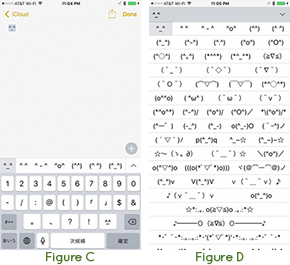 The emoji keyboard has long been enjoyed by iOS users and has become so popular that it is enabled by the majority of users as soon as they unbox their iOS devices. What you may not know is that there is also an emoji keyboard that is text based, similar to how you used to make them up on your own, except made for you. To enable this keyboard:
- Open Settings -> General -> Keyboard -> Keyboards
- Select “Add New Keyboard.”
- Select Japanese -> Romaji.
When you want to enter a text-based emoji:
- Open iMessage, Notes or any other app with text entry.
- Select the Keyboard button and the Japanese keyboard.
- Select the Number button for the number keys.
- Select the face button that appears (Figure C).
- Select the up arrow on the small strip that appears above the keyboard (Figure D).
- Tap on a text-based emoji from the list that appears to enter it just like the standard emoji keyboard.
5. Redial last used phone number
 If you receive and make a lot of calls to the same number, it may be a pain to redial a number that isn’t in your contacts list. This hidden shortcut makes it easy to redial a number from your recent calls list without having to find that number.
To do this, open the Phone app, tap on the Dial tab and then tap on the green Call button (Figure E). After doing this, the last dialed number will appear in the dialer area. Then, tapping the green Call button again will initiate a call to the number.
Do you have other favorite hidden iOS 9 features we didn’t cover? If so, email us at info@techorchard.com and we’ll feature your thoughts in an upcoming post!