Each time Apple announces an upgrade to its mobile operating system, users are both excited and fearful of what they will find. Though iOS 9.3 was not devoid of issues upon launch (Apple has released the iOS 9.3.1 update that fixes a bug which affected those with certain apps installed and crash Safari, and resolved authentication issues for iPad 2), it remains the biggest incremental update to Apple mobile devices in several years. In fact, business users in particular may be pleasantly surprised by these 6 iOS 9.3 tips and tricks they can use to take advantage of some new features that may impact their lives at work:
- “Train” Apple News with ease — Like the Pandora music app, you can “train” the news app to customize your newsfeed by simply swiping left or right on a story to “like” or “dislike.”

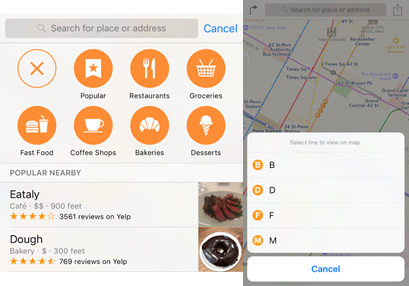
- Simplify meetings out with Apple Maps — Utilize information provided based on Yelp for nearby drinks, eats and other attractions. Plus, access city transit line information (New York and certain other large cities are supported) by tapping on a line on the map to check its stops.
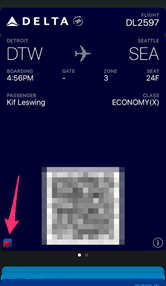
- Link Wallet and Company apps — Streamline your workflow by using a new shortcut on your wallet app cards to link to a company app if installed.
- Make the most of keyboard shortcuts — If you use a physical keyboard with your iPad or iPhone, getting around is easier in the Mail app by using the arrow keys, and in Safari by using the spacebar.
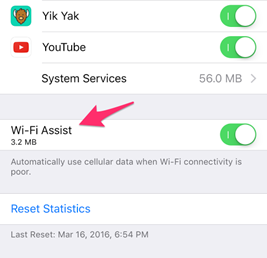
- Auto-connect with stronger Wi-Fi — For cellular equipped iPads, this feature automatically switches your internet connection from a weak Wi-Fi connection to a stronger cellular one when available. Just remember that it could eat through your data plan if you’re not careful. Navigate to Settings > Cellular to toggle this on or off.
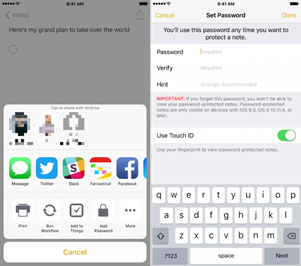
- Protect your notes from prying eyes — Lock the Notes App with a passcode or touch ID. Simply go to Settings > Notes > Password Protection to enable or disable this option.
Are there other iOS 9.3 tips and tricks you use to leverage mobility at work? Use the share icons below to let us know on Facebook or Twitter!