As enterprises began favoring the shift from software running on PCs to mobile devices connected to cloud services, Microsoft 365 was all but written off by many of its critics. Fortunately for Microsoft, their vision for remaking the company into a subscription provider whose customers rent, rather than buy, software is paying off. In fact, according to Skyhigh’s Office 365 Adoption & Risk Report issued in second quarter 2016, one out of every five corporate employees was using an Office 365 cloud service, up from less than 7 percent just nine months prior. Put another way, in the last two years Office 365 has eclipsed all other cloud providers to emerge as the most widely used enterprise cloud service by user count.
Furthermore, after analyzing usage of over 20,000 cloud services, Skyhigh found that 58.4 percent of sensitive data in the cloud is stored in Microsoft Office documents. If using sensitive information (i.e., business plans, medical records, financial forecasts) as a proxy for business-critical data, it’s clear that the dominant platform for working with this information remains Microsoft Office. Despite the popularity and prevalence of Office 365, insider threats and compromised accounts remain a challenge for enterprises using this technology.
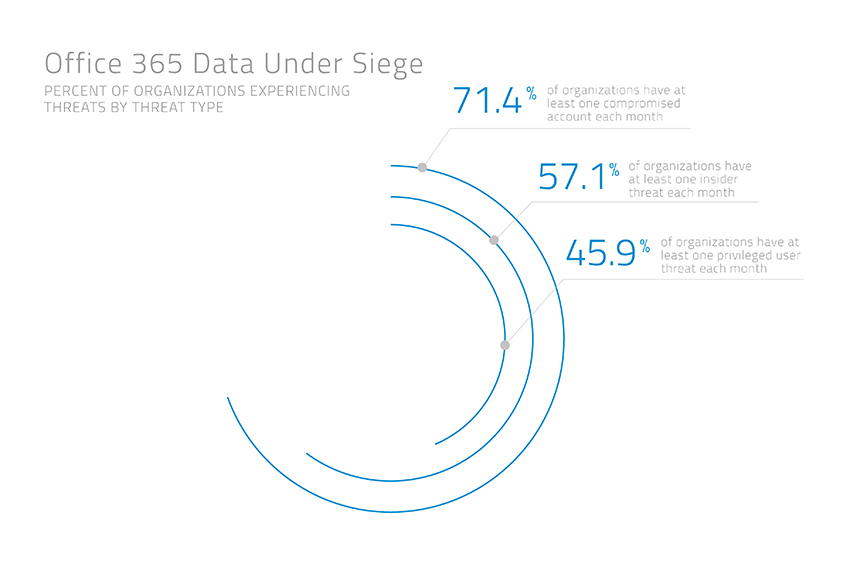 Source: Skyhigh, available online here
To enable consumer simple, secure access to Office 365, VMware has enhanced its Workspace ONE offerings. The following is an excerpt from the VMware blog detailing what we can expect from the new Workspace ONE capabilities:
Workspace ONE for Office 365 & Beyond
As organizations consider Workspace ONE for Office 365, the great thing is that these features are not specific to only Office 365. We extend this functionality as part of Workspace ONE to all apps, enabling the secure delivery of digital workspaces to any user on any device. This includes:
- Automatic de-provisioning of Office 365 or G Suite (previously Google Apps) accounts when an employee leaves the company. By automating the de-provisioning of accounts, even an authenticated user with a valid token will be rejected access once the user is deactivated in Active Directory.
- Step-up, two-factor authentication with VMware Verify: Organizations can require two-factor authentication when end users access secure apps. With the VMware Verify app, included in Workspace ONE, two-factor authentication approval is just one swipe away using of mobile push notifications.
- Adaptive Management: Using Workspace ONE, organizations can block access to apps like Office 365 from unmanaged devices. Using consumer-simple workflows, we streamlined end-user enrollment to access apps. Once enrolled, IT benefits from device compliance checks and enterprise wipe.
- Prevent access from noncompliant devices: If a device becomes noncompliant, access can be immediately removed. This is important in cases where devices are jailbroken and/or rooted or if a user tries to disable passcodes on their device.
- Data Leakage Protection (DLP): Leveraging native platform controls to containerize apps, you can encrypt data, inhibit moving of emails, prevent users from opening attachments in personal apps and set DLP policies, such as restricting copy/paste and open-in controls.
Watch this video for a demo, or contact Tech Orchard for more information on how you can successfully and safely deploy Office 365 in your organization.